Enjoy Streaming Simplified

TV Now

Available in Belleville, Beloit, Cawker City, Concordia, Downs, Formoso, Glen Elder, Jamestown, Jewell, Mankato, Randall, Scandia and Simpson

TV Now is a streaming TV service available exclusively to Cunningham Fiber’s internet customers. No more cable setups or DVR boxes! With TV Now, your family can watch your favorite shows on the streaming devices you already own — smartphones, tablets and the streaming device connected to your TV. Free Cloud DVR, Replay TV, Restart TV and HD are included. Watch what you want, when you want, how you want and where you want

TV NOW EXTREME BUNDLE

monthly
$ 227 *

Cunningham 100X20 Cable Internet
Worry-Free WiFi
TV Now with Expanded Basic Channel Lineup
Free HD, Cloud DVR, Video on Demand, Replay TV and Restart TV
TV Everywhere for Access to Programming Away from Your Home

Additional Entertainment

Digital Basic

monthly
$ 14.95

Add more sports, more drama, more movies and more learning along with a wide variety of music.

Cinemax MultiMax

monthly
$ 10.25

Includes Cinemax, More Max, Action Max and Thriller Max.

HBO

monthly
$ 18.5 0

Including HBO, HBO2, HBO Signature, HBO Family, HBO Comedy, and HBO Zone

Showtime Unlimited

monthly
$ 16.75

Including Showtime, Showtime Too, Showtime Showcase, Showtime Extreme, Showtime Next, Showtime Family Zone, Showtime Women, The Movie Channel, TMC Extra and Flix

Starz

monthly
$ 11.25

Twelve Starz channels with something for everyone, from Kids and Family to Western and more, it’s all there!

*Price does not include taxes and surcharges. Price subject to change. 

TV Now Channels

Channels available at your home depend on which county the service address is located.

Wichita DMA

Counties

Mitchell
Jewell
Osborne

Topeka DMA

County

Cloud

Lincoln DMA

County

Republic

Use Your Own Streaming Devices

Amazon Fire TV

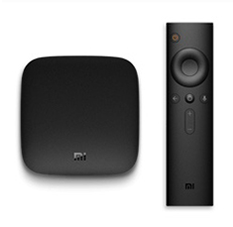
Android TV

All Supported Devices

Mobile Phone

Tablet

Smart TV

Streaming Stick

Streaming STB

Browser

Web Browser Access

TV Now FAQs

Have a question, but not seeing it below? Please contact our office at 1-800-8495 and we’ll be happy to help.

TV Now is a streaming service available exclusively to Cunningham Internet customers with 50 Mbps or faster Internet.
TV Now is a full featured, streaming TV app that you download and install your favorite streaming media devices including Apple TV, Amazon Fire TV, Android and Roku. You can access your subscription through the TV Now app that runs on your streaming device. It is an either-or option to traditional TV and not an add-on service to the traditional Cunningham cable TV service.
TV Now is packed with free features you’re going to love! Your subscription includes free HD and cloud DVR. You’ll also receive Replay TV and Restart TV and unlimited tuners for recording.
It’s easy to sign up for TV Now. Simply call Cunningham Telephone & Cable to sign up at 800-287-8495 or visit one of our local offices at Glen Elder, Beloit, Concordia or Belleville.
Yes, we will do a full professional install for you and help you learn how use your Cunningham TV Now service.
Visit the devices section of this page (above) for a list of supported devices.
No, this is an exclusive offer for Cunningham internet customers.
Yes. We carry all major national broadcast channels in all the areas we service.
Our smaller Cunningham TV Now bundles include 2 viewing streams and 100 hours of Cloud DVR and larger bundles have 3 viewing streams and 150 hours of Cloud DVR. Additional Streams and increments of 50 Cloud DVR hours are available together at only $5/mo. We recommend getting one stream for each member of your household.
The number of devices you can watch on is the same as the number of viewing streams available on your account. If you need to log out of a device to utilize your stream on another device, navigate to the settings icon and log out.
Bring up the menu with your device remote. (Instructions vary by device.) Navigate to the fourth icon from the left and select it. You will see your Recorded shows and Scheduled shows. You may also view how many hours of content are recorded and how many remain. You may add 50 more hours and an additional stream for $5 per month.
Select the program you would like to record in the guide. The menu will give you several options including Play and Record. Navigate to Record and select it. If it is a series, you can select to record only this episode or all episodes. You may also then go back into the scheduled recording and edit the series to start or end later.
Restart TV is a great option available with select programs and channels that lets you start the program you are on from the beginning, even if it’s half over! Never miss the beginning again! It is available with most channels. When you see a program you want to start over, select it and press play. Depending upon the device you are using, it will either have an option immediately to select Restart or after the program begins, a prompt will ask if you’d like to start from the beginning.
The fast-forward feature is available when watching DVR recordings. It is not available when watching live TV, Restart TV or Replay TV.
Absolutely! As long as your device is connected to your home wi-fi connection, you can watch it anywhere around your house!
Yes! TV Everywhere works the same as it does for traditional Cunningham TV customers today. The process for creating and using an account is the same. If you already have a TV Everywhere account, your login information will remain the same. For new TV Everywhere subscribers, call our main office at 800-287-8495.
Yes. We have Amazon Fire TV Sticks available for purchase. You can also order your preferred device online or buy in many retail locations.
Press up or down on your directional keys on your remote to change channels one at a time.
 
Press the remote button to bring up the guide. Navigate to the fourth icon from the left and select. Navigate to the icon on the top right and select. From settings, you can set up parental controls, manage user profiles, and sign out of the app.
Yes, you can access parental controls in the settings. By enabling parental controls, a PIN is required to play content with TV-MA, R, or NC-17 ratings.
If you are not currently a customer, call Cunningham Telephone & Cable at 800-287-8495 or visit one of our local offices to sign up and receive your username and password.
You can utilize your smartphone or tablet as your device remote. To do so, go to the app store of your device. Download the remote control app for your device. App names are Amazon Fire TV Remote, Apple TV Remote, and Android TV. Follow the individual instructions for the app.
Search and download the Cunningham app with our logo from the app store. Enter in your Cunningham TV Now username and password to sign into our app and begin watching.
Simply go to one of the streaming devices that you have recently watched TV Now on, go to Setting, and log out of the TV Now app. This will stop that stream.
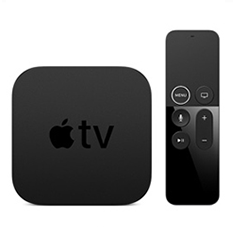
View our instructional video on our website (section above) or visit Apple TV Support.
View our instructional video on our website (section above) or visit Amazon Fire TV Support.
View our instructional video on our website (section above) or visit Android TV Support.
Simply look at the bottom of the device, and look at the FCC ID, Version 1 is 2ABDU-0509. This version of Fire Stick TV will not work with TV Now.
Visit our support page or call 800-287-8495.
You may call our main office at 800-287-8495 for assistance.

Interested in our services?